

Interfering Substances causing errors in NAAT Assay
ContentIt is common in laboratories to see specimens with the following particles which may potentially alter nucleic acid amplification test (NAAT) results:
- Food particles
- Blood
- Tobacco
- Pan
- Debris or tissue pieces
These interfering substances cause failures in Truenat assays and may have inhibitory effects on CBNAAT assays. This interferes with the accuracy of results, leading to false positive or negative tests and delayed cycle threshold values.
Hence, it is important to follow certain precautions when collecting the specimen to avoid contaminating the specimen with these substances.
In such situations, the following protocol needs to be followed:
- Reject frank blood/bloody samples; however, the presence of blood up until 30% does not interfere in Truenat assays
- For samples containing food/tobacco/tissue particles that cause interference in processing:
- Use a fresh sample, if available
- Use a sample after food particles or tissue pieces settle/sediment; otherwise, reject the sample
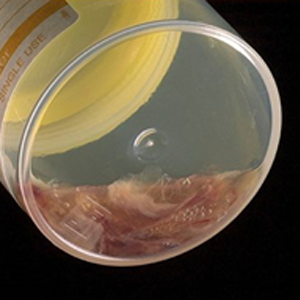
Figure: Blood in Sputum Sample Interferes with PCR
Resources
Monitoring Different Types of Errors with Truenat
ContentMonitoring of Truenat errors
There are various types of errors that occur with the Truenat machines, which include:
- Coded errors related to the Trueprep AUTO v2 sample prep device
- Coded errors related to the Truelab micro-PCR Analyzer
- Non-coded system errors/failures
Monitoring the Trueprep AUTO v2 errors
-
The Truenat system is a closed amplification system (i.e., the amplified product is sealed in the chip), and an enzyme system is incorporated in the reaction mix to prevent previously amplified material from getting re-amplified.
- It is recommended that testing sites perform negative control tests using Trueprep AUTO lysis buffer reagent and sterile Phosphate Buffered Saline (PBS) monthly or when contamination is suspected (e.g., an unusually high proportion of specimens with ‘M.tb detected’).
- Swab testing of work surfaces and both the Truelab and Trueprep machines should be conducted monthly.
- Used and expired cartridges should be discarded as per the protocols, so they are not re-used.
Monitoring the Truelab errors
-
To ensure that the Truelab micro Polymerase Chain Reaction (PCR) Analyzer is working accurately, the manufacturer recommends running positive and negative controls (which can be purchased as part of the Truenat™ Positive Control Kit- Panel I) periodically.
- The positive and negative controls can also be used for lot-to-lot verification and assessment of reagents if the temperature of storage areas falls outside the recommended ranges.
- An optional “Plot” view on the digital interface is also available while the process is being performed that allows for monitoring test progress in real-time.
- Truelab Analyzers can be configured to send data on device performance to the manufacturer’s (default configuration) or local servers to allow the manufacturer (without sharing any patient data) and/or the National TB Elimination Programme to monitor instrument performance on a real-time basis.
- This helps in the identification and possible prevention of instrument malfunctions or breakdowns, detection of user errors and retraining needs, and monitoring of instrument and test utilization across fleets of instruments.
Resources
- Guidelines on Programmatic Management of Drug-resistant TB (PMDT) in India;CTD, MoHFW, India,2021.
- Trueprep AUTO v2 Universal Cartridge Based Sample Prep Device; User Manual V4.
- TRUELAB UNO Dx Real Time Quantitative micro PCR Analyzer; manual VER 04.
Assessment
Question Answer 1 Answer 2 Answer 3 Answer 4 Correct answer Correct explanation Page id Part of Pre-test Part of Post-test Identify if the statement is True or False
Running positive and negative controls periodically is recommended to ensure that the Truelab micro PCR Analyzer is working accurately.
True False 1 Running positive and negative controls periodically is recommended by the manufacturer to ensure that the Truelab micro PCR Analyzer is working accurately Yes Yes Truelab Analyzers can be configured to send data on device performance to the manufacturer’s (default configuration) or local servers to allow the manufacturer (without sharing any patient data) and/or the National TB Elimination Programme to monitor instrument performance on a real-time basis.
True False 1 This helps in the identification and possible prevention of instrument malfunctions or breakdowns, detection of user errors and retraining needs, and monitoring of instrument and test utilization across fleets of instruments. Yes
Yes
Trueprep Error Classes and actions
ContentTrueprep Error Classes
The Trueprep errors are classified as:
-
Cartridge Errors
-
Reagent Pack Errors
-
Device Errors and Warnings
Image
Figure 1: Classification of Trueprep errors
Trueprep Error Actions
I Cartridge Error Actions
Image
Figure 2: Actions for Trueprep cartridge errors
II Reagent Error Actions
Image
Figure 3: Actions for Trueprep reagent errors
III Device Error and Warning Actions
Image
Figure 4: Actions for Trueprep device errors and warnings
Resource
-
Guidelines on Programmatic Management of Drug-resistant TB (PMDT) in India, 2021, CTD, MoHFW, India.
-
Trueprep AUTO v2 Universal Cartridge Based Sample Prep Device; User Manual V4.
Assessment
Question
Answer 1
Answer 2
Answer 3
Answer 4
Correct answer
Correct explanation
Page id
Part of Pre-test
Part of Post-test
In ‘E11 – RTD L Error’, what does L stand for?
Liquid
Lower
Light
Lysis
4
In E11 - RTD L Error (The code L is for error in the Lysis Heater)
Yes
Yes
-
Truelab Error Classes and actions
ContentHere we discuss the error classes and actions in Truelab.
Truelab Errors - Classes and Actions
Error Class
Error Name
Reason for the error
Error Actions
Error 1
Thermal Cycling Error
Occurs when the test chip is faulty and the thermal cycling does not happen.
Re-run the same elute using another chip. If the error repeats, process the sample again and re-run the elute using another chip. If the problem still persists, contact the Molbio support team.
Error 2
Test Stopped Manually
Occurs when the user has manually stopped the ongoing test and the analyser does not have sufficient run time to compute data.
Error 3
Incorrect Optical Profile
Occurs when there is a deviation in the expected optical profile due to a reduction in reaction volume in the chip during the course of the reaction.
Error 4
Runtime Error
Occurs when run data capture/ analysis is incomplete.
Error 5
Probe Check Error
Occurs in the event of a low initial signal due to insufficient mastermix dispensed onto the chip.
Invalid
Whenever Truelab displays the result as 'INVALID', it means that the internal control did not amplify in Polymerase Chain Reaction (PCR) or sample extraction was not proper.
Resources
-
Trueprep AUTO v2 Universal Cartridge Based Sample Prep Device, User Manual Version 4.
-
Truelab UNO Dx Real-time Quantitative Micro PCR Analyzer Manual Version 4.
-
Guidelines on Programmatic Management of Drug-resistant TB (PMDT) in India, 2021, CTD, MoHFW, India.
Assessment
Question
Answer 1
Answer 2
Answer 3
Answer 4
Correct answer
Correct explanation
Page id
Part of Pre-test
Part of Post-test
When does thermal cycling error occur in Truelab's real-time micro PCR analyzer?
Occurs when the test chip is faulty and the thermal cycling does not happen.
Occurs when run data capture/ analysis is incomplete.
Occurs in the event of low initial signal.
Occurs when the user has manually stopped the ongoing test.
1
Thermal cycling error occurs when the test chip is faulty and the thermal cycling does not happen.
Yes
Yes
When does the Runtime Error occur in Truelab's real-time micro PCR analyzer? Occurs when the test chip is faulty and the thermal cycling does not happen.
Occurs when run data capture/ analysis is incomplete.
Occurs in the event of low initial signal.
Occurs when the user has manually stopped the ongoing test.
2 Runtime error occurs when run data capture/ analysis is incomplete. Yes
Yes
-
Troubleshooting Failures Without Error Codes
ContentThe Truenat is a rapid molecular diagnostic method based on the Nucleic Acid Amplification Testing (NAAT) principle. Truenat uses portable, battery-operated devices to rapidly detect Mycobacterium tuberculosis Complex Bacteria (MTBC) and Rifampicin resistance.
Truenat system involves two main devices:
- Trueprep® AUTO v2 Universal Cartridge based Sample Prep Device: Used for the automated extraction and purification of DeoxyriboNucleic Acid (DNA).
- Truelab® Real Time micro-PCR Analyzer: Used for performing Real-Time Polymerase Chain Reaction (RT-PCR), resulting in the semi-quantitative detection of MTBC.
The errors in Truenat are broadly categorised as:
- Errors with codes (Trueprep and Truelab errors)
- Errors without codes (System failures)
The errors without codes in Truenat and the ways to resolve them are listed in the table below:
Sl. No. System failures Reason Troubleshoot 1 ‘Unable to read chip information’ Analyzer was unable to read chip memory Check if the chip was loaded properly into the tray. Remove the chip and re-select the profile from Status Screen and repeat the steps. If the message reappears, load a new chip and re-load the elute again 2 ‘Could not initialize. Please try again’ The system was unable to establish an internal connection Attempt the test again by using a new chip and re-loading the elute again 3 “Chip is already used” OR “Chip loaded is expired” User loaded a used chip/expired chip in the tray Use a fresh chip and re-load the elute 4 Login attempt failure Login failed due to incorrect password entered Re-enter the correct password 5 Invalid patient name in sample details screen The patient’s name in the sample details section is blank Fill patient’s name in the sample details section Resource
-
Guidelines on Programmatic Management of Drug-resistant TB (PMDT) in India; CTD, MoHFW, India. 2021.
-
Trueprep AUTO v2 Universal Cartridge Based Sample Prep Device; User Manual V4.
-
TRUELAB UNO Dx Real Time Quantitative micro PCR Analyzer; manual VER 04.
Assessment
Question
Answer 1
Answer 2
Answer 3
Answer 4
Correct answer
Correct explanation
Page id
Part of Pre-test
Part of Post-test
What should you do when you get a system failure alert as:
“ Chip is already used” ?
Re-insert the same chip
Insert a fresh chip
Do not insert any chip
None of the above
2
When you get a system failure alert as: “ Chip is already used” , Use a fresh chip and re-load the elute.
Yes
Yes
What should you do when you get a system failure alert as:
"Unable to read chip information"
Re-insert the same chip
Insert a fresh chip
Do not insert any chip
Check if chip is loaded properly, remove the chip and reselect the profile from status screen and repeat the steps.
4 When you get a system failure alert as "Unable to read chip information" Check if the chip was loaded properly into the tray. Remove the chip and re-select the profile from Status Screen and repeat the steps. If the message reappears, load a new chip and re-load the elute again Yes
Yes
Fullscreen