

TB Treatment Card
ContentThe Tuberculosis Treatment Card is a paper-based recording form that is kept in the institution treating the TB patient under the National TB Elimination Programme (NTEP). It is a pre-requisite documentation related to treatment services offered to TB patients under NTEP.
Uses of the TB Treatment Card
The TB treatment card is primarily used for:
- Documenting administered drugs with their dosages
- Documenting follow-up investigation results
- Monitoring adherence to treatment
- Recording adverse events
- Recording treatment outcomes
There are two pages in the TB treatment card and details in each page is delineated in the table below.
Table: Parts of the Treatment Card; Source: NTEP Training Module 2 for Programme Managers & Medical Officers, p. 105
PAGE
DETAILS CONTAINED IN PAGE
The First Page
Patient details such as name, age, sex and address of the patient
Type of disease History of anti-TB treatment Regimen prescribed and duration of treatment Results of investigation before and during treatment Comorbidity-related information Contact tracing and chemoprophylaxis details Social habits such as tobacco and alcohol use The Back Page
Details of intensive and continuation phases of treatment including drug details and adherence monitoring
Retrieval actions for missing doses Adverse events Post treatment follow-up, nutritional support details and remarks Treatment outcome Important Points to Note
- The TB treatment card is filled at the Peripheral Health Institution (PHI) when a patient is initiated on treatment.
- The original TB treatment card is kept at the PHI and updated fortnightly.
- A duplicate treatment card is to be given to the treatment supporter for documentation of daily events.
- The treatment supporter should be trained on how to record the treatment card.
- Details on the patient’s HIV status are not included in the treatment supporter’s copy to maintain confidentiality.
The figure below shows the 1st page of the TB treatment card. Click here to access the full form in the NTEP Training Modules 1-4 for Programme Managers & Medical Officers, p. 223.
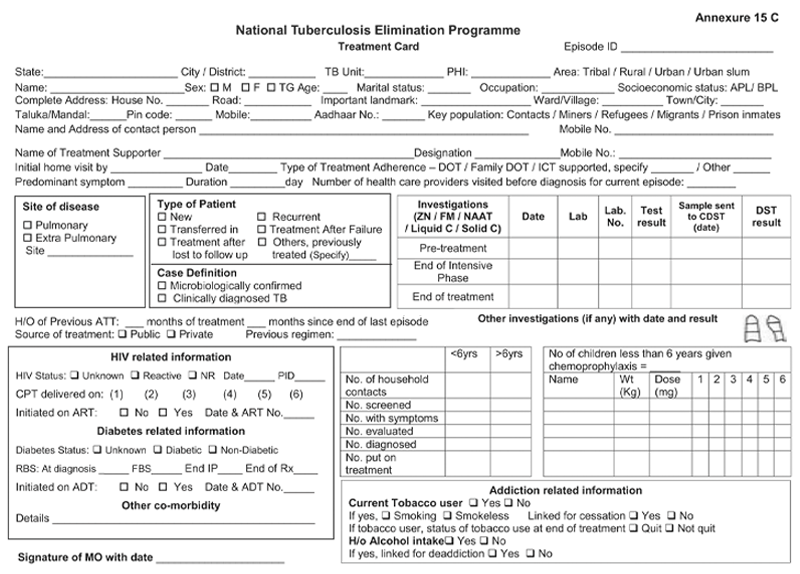
Figure: First Page of the TB Treatment Card; Source: NTEP Training Modules 1-4 for Programme Managers & Medical Officers, p. 223
Resources
Kindly provide your valuable feedback on the page to the link provided HERE
NTEP TB ID Card
ContentIn the National TB Elimination Programme (NTEP), the ‘NTEP TB identity card’ is provided for their identification and record of clinical follow-ups.
The identity card is completed for each patient who has a Tuberculosis (TB) Treatment Card, and it is kept with the patient. Information from the TB Treatment Card is used to complete the identity card.
There are 3 parts in the NTEP TB identity card and details in each part is delineated in Table 1.
Table 1: Parts of the NTEP TB identity card; Source: NTEP Training Module 2 for Programme Managers & Medical Officers, p. 105
PART
DETAILS CONTAINED IN THE SECTION
The First and Second Part
Patient information
Name and address of the TB unit/ district
Treatment details of the patient including:
- Disease classification
- Type of patient
- Treatment provider
- Case definition
- Weight bands
- Dosage
- Sputum results
- Culture results
- Results of follow-up smear examinations
- Results of follow-up cultures
- Information on the date of treatment initiation
- Treatment outcome
The Back Part
Appointment dates for visits to NTEP facilities
Contact details of NTEP staff in case of side events/queries
The information contained in this card will help to continue treatment in case the patient is transferred or admitted to any other health facility any time during the treatment period. The TB identity card is shown in Figure 1.
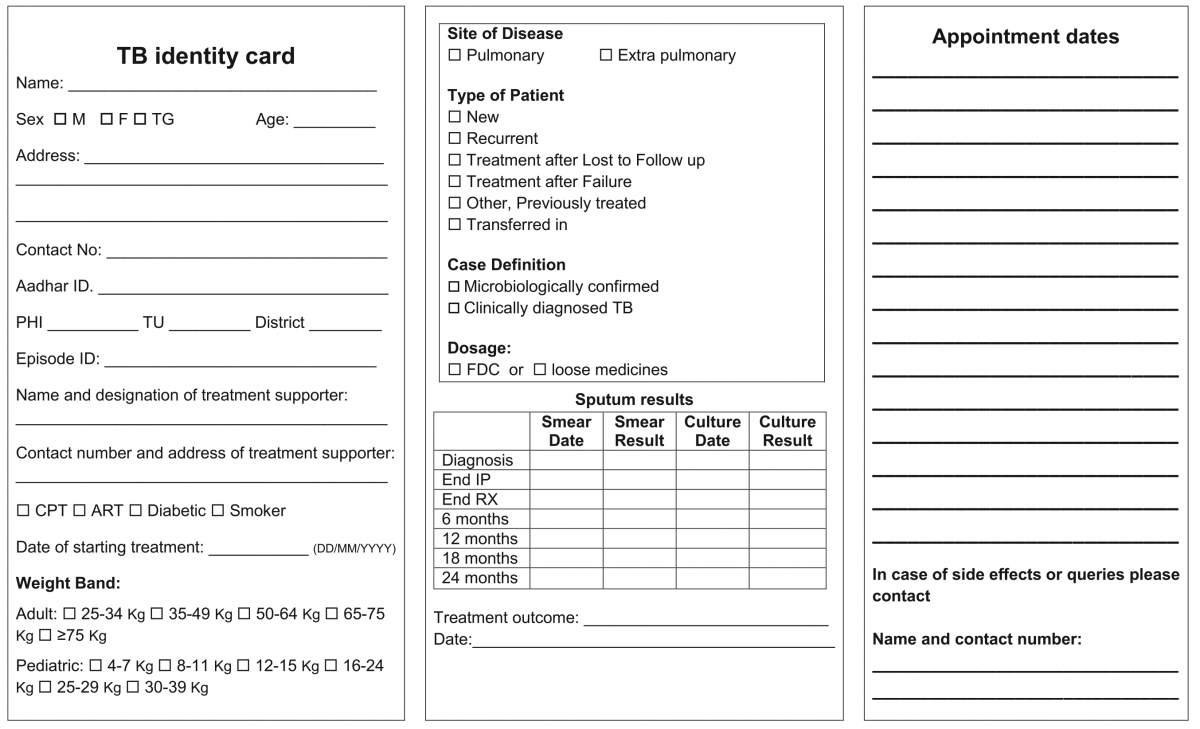
Figure 1: NTEP TB Identity Card; Source: NTEP Training Modules 1-4 for Programme Managers & Medical Officers, 2020

Figure 2: Sample of a patient’s TB identity card


Resources
Kindly provide your valuable feedback on the page to the link provided HERE
Transfer of TB Patient
ContentTB patients may not stay in one place throughout the treatment duration. When they move from one place to other, there should be a mechanism to hand over the responsibility of continuing the patient's treatment in a facility near the new place of the patient. This is the concept of patient transfer and can be easily managed in Nikshay portal.
- The transfer module in Nikshay enables transfer requests of patients between Health Facilities (HFs) across the country.
- Provision of shifting of patient from one HF to another is possible if the patient changes his/her residence for the purpose of treatment.
- The requests are of two types: “Transfer In” and “Transfer Out”.
- All transfer requests needs to be accepted by the “District/ TB Unit (TU)/ Peripheral Health Institute (PHI)” where the transfer request is made in order for it to take effect.
- Transfer requests can be made to even the District/ TU level. However, it can be completed only once the “Transferred to PHI” has been assigned.

Figure: Transfer Management in Nikshay; Source: Nikshay Zendesk, Nikshay Knowledge Base, Advanced Transfer in Web.
Steps in Transfer of TB Patient
1. In Nikshay, the referring HF updates details from the current HF of patient to the HF where patient is being transferred.
2. The receiving HF gets the intimation about the transfer.
The patient transfer module also provides the provision to pull the patient belonging to another HF to the recipient HF. The accountability of the transferred patients is now with the receiving HF and the treatment initiating facility.
A separate transfer register is also available to get details about various transfers from and to a given district, which can be downloaded from Nikshay reports.
Resources
- Nikshay Zendesk, Nikshay Knowledge Base, Advanced Transfer in Web.
- Guidelines for PMDT in India, 2021.
Assessment
Question
Answer 1
Answer 2
Answer 3
Answer 4
Correct answer
Correct explanation
Page id
Part of Pre-test
Part of Post-test
Transfer requests include "Transfer In" and "Transfer Out".
True
False
1
Transfer requests include "Transfer In" and "Transfer Out".
Yes
Yes
Fullscreen
