Preparation of Reagents for ZN Microscopy

The National TB Elimination Program (NTEP) recommends freshly preparing reagents from commercial procured products, at the District TB units to be used for microscopy. Chemicals need to be carefully monitored for potency and the calculation needs to be accurate while preparing reagents for smear microscopy.


For Preparing 1% Carbol Fuchsin (500ml): The required chemicals and materials for preparing 500 ml Carbol Fuchsin are:

1. Basic Fuchsin

SOP for Packaging Specimens during the Transportation of Biological Specimens for TB Diagnosis

Standard Operating Procedure (SOP) for Packaging Specimen during the transportation of biological specimens for TB diagnosis, also known as Triple Layer Packaging, is as follows:

The Lab Technicians (LTs) at the Designated Microscopy Centres (DMCs) should be trained to carefully pack the sputum samples in the cold box to avoid spillage of the samples. Before packing, personal protection measures such as wearing hand gloves (double gloves preferred), goggles and masks are to be followed by the LTs to prevent contracting the infection.


CBNAAT Cartridge Loading

  • Use the sterile transfer pipette provided in the CBNAAT kit to draw liquefied sample into the transfer pipette
    • The minimum amount to be loaded into the cartridge is 2 ml
    • Do not process the sample if there is insufficient volume
  • Open the cartridge lid
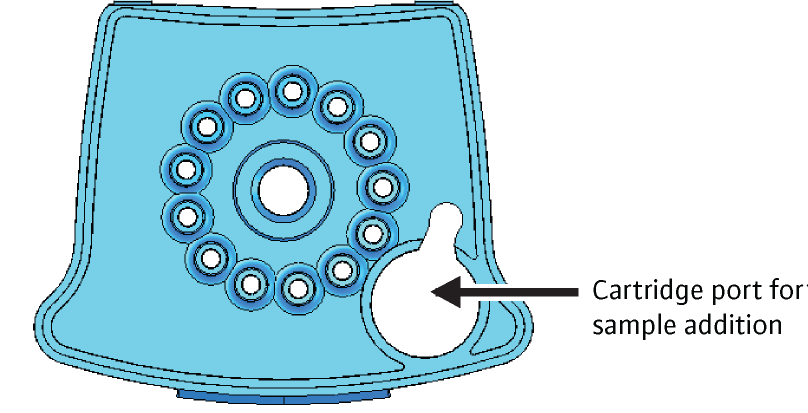
  • Transfer the sample into the open port (Figure 1) of the CBNAAT cartridge and dispense slowly to minimize the risk of aerosol formation


CBNAAT Monthly Data Archive and Data Back-up Process

The Cartridge-based Nucleic Acid Amplification Test (CBNAAT) files should be archived and saved to a CD or other appropriate external media (preferably an external drive), at least once a month to ensure that no test data are lost.

Archiving tests creates copies of the test data in “gxx” files. 

Importance of Archiving and Back-up 

Archiving allows you to:

1. Back-up data to ensure it will not be lost if the computer breaks down.

Monitoring Different Types of Errors with CBNAAT

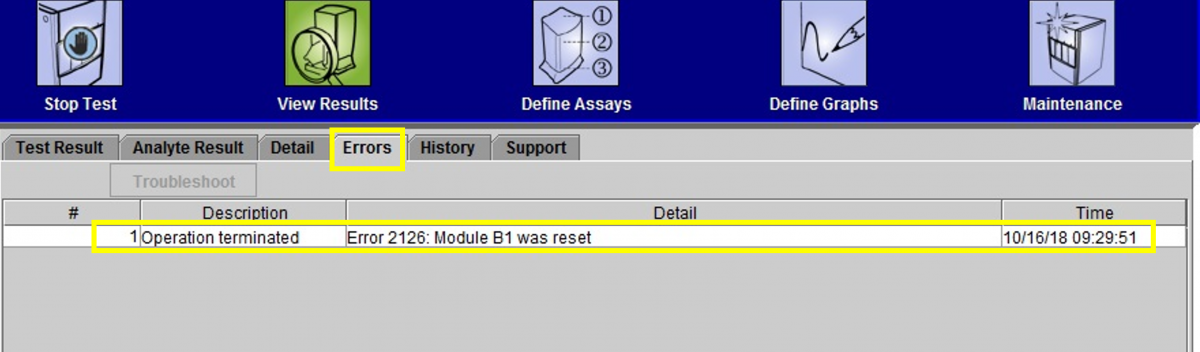
While using the CBNAAT machine in a laboratory setting, many different causes can lead to an error (indicated on-screen as ‘ERROR’, as in figure 1).

Figure 1: Window showing how to click on “Errors” to learn more about the issue

Error Message Categories

The errors are displayed by the instrument’s software to highlight various technical issues that disrupt the test process. They are grouped into five categories by the software:

Subscribe to LT-Microscopy & NAAT