

Truenat MTB Assay Results Interpretation: Visualization
ContentTruenat MTB Assay results are visualized:
- During testing
- Completion of test
Test Status Screen (Figure 1)
Results visualization during testing include:
- “Green” Test Progress Bar helps to monitor the test progress and the current cycle number.
- “Yellow” Cycle Progress Bar indicates the progress of the current cycle.
- Test Details Bar indicates patient details, sample type, system health, battery level, current cycle temperature.
- “Red” Test Completion Indicator turns green when the test completes.
- PLOT button displays optical (fluorescence measure) and thermal graphs (temperature during PCR) on real time basis.

Figure 1: Test Status Screen; Source: TrueLab Manual
Test Result Screen (Figure 2(A)-(E))
On tapping the "Result" button, results visualization on the completion of test includes:
- Input details display; Patient details - Name, ID, Age, Sex, Referred by
- Chip details display; Type of Chip - Truenat MTB/ Truenat MTB Rif
- Test results of Truenat MTB:
- DETECTED
- NOT DETECTED
- Error
- Test results Truenat MTB-Rif Dx:
- Rif Resistance Detected
- Rif Resistance Not Detected
- Indeterminate
- Error
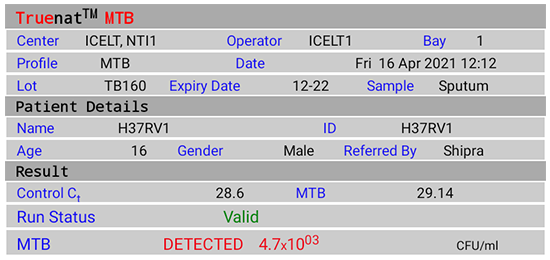
Figure 2(A): Truenat MTB Test Result Screen; DETECTED; Source: MolBio Diagnostics Pvt. Ltd.
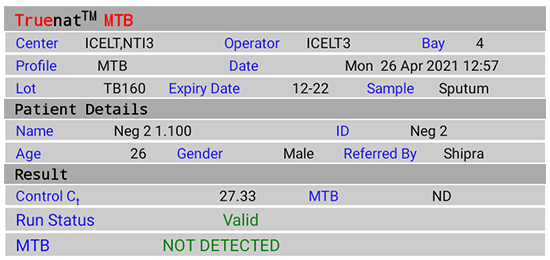
Figure 2(B): Truenat MTB Test Result Screen; NOT DETECTED; Source: MolBio Diagnostics Pvt. Ltd.

Figure 2(C): Truenat MTB Rif Test Result Screen; Rif Resistance Detected; Source: MolBio Diagnostics Pvt. Ltd.
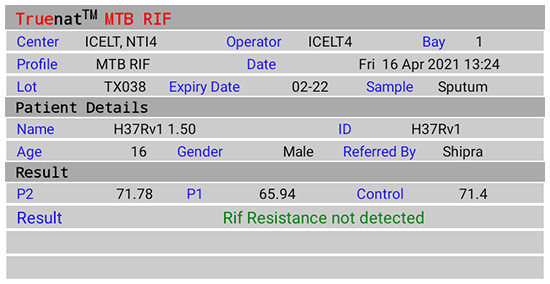
Figure 2(D): Truenat MTB Rif Test Result Screen; Rif Resistance Not Detected; Source: MolBio Diagnostics Pvt. Ltd.

Figure 2(E): Truenat MTB Rif Test Result Screen; Indeterminate; Source: MolBio Diagnostics Pvt. Ltd.
Video fileResources
Kindly provide your valuable feedback on the page to the link provided HERE
TrueNAT MTB Assay Results Interpretation: Detection of Mycobacterium tuberculosis and RIF Resistance
ContentOn completion of test run, the Test Result Screen displays the results for:
- Detection of Mycobacterium tuberculosis (Truenat MTB)
- “DETECTED” for Positive result, Cycle Threshold (Ct) value, Colony Forming Units per milliliter (CFU/ ml)
- “NOT DETECTED” for Negative result
- “Valid”/ “Invalid” for test validity based on amplification of Internal Positive Control (IPC)
- “Error” for test failure
- Detection of Rif Resistance (Truenat MTB-Rif Dx)
- “Rif Resistance Detected” if mutations to Rif are detected
- “Rif Resistance Not Detected” if mutations to Rif are not detected
- “Indeterminate” when test did not determine resistance to Rif
- “Error” for test failure
Resources
Kindly provide your valuable feedback on the page to the link provided HERE
- Detection of Mycobacterium tuberculosis (Truenat MTB)
Retrieving test results from the Truenat machine
ContentVideo fileRecording Truenat Results
ContentVideo fileResults Entry in Lab Register for NAAT
ContentThe results for Nucleic Acid Amplification Test (NAAT) assays are entered in Culture and Drug Susceptibility Testing (C&DST) register. The key variables entered are shown in the table below.
Table: Key Variables entered in C&DST Register; Source: Guidelines for PMDT in India, 2021. VARIABLES SET 1 VARIABLES SET 2 VARIABLES SET 3 VARIABLES SET 4 Test ID Health Facility (HF) name Residential district Current facility HF type Date of test updated in Nikshay Lab type Type of test Predominant symptom Date tested Patient ID Reason for testing Predominant symptom duration Date reported Episode ID Treatment status History of Anti-TB Treatment (ATT) Test status Name Diagnosis date No. of Health Care Provider (HCP) visited before the diagnosis of the current episode Type of specimen Gender TB treatment start date The visual appearance of sputum Date of specimen collection Age Current facility state State name Primary phone Current facility district District name Address Current facility TB Unit (TU) TB unit Residential state Current facility HF NAAT results are reported in the results section of “Request Form for examination of biological specimen for TB” including:
- Select Type of test: Cartridge-based Nucleic Acid Amplification Test (CBNAAT)/ TrueNAT
- Select Sample: A/B
- Select M. tuberculosis: Detected/ Not Detected/ Not Available (NA)
- Select Rif Resistance: Detected/ Not Detected/ Indeterminate/ NA
- Select Test: No result/ Invalid/ Error; Error code
- Date tested
- Date Reported
- Reported by (name and signature)
- Laboratory name
Video fileVideo : CBNAAT/Truenat Results Entry in Lab Register
Resources
Reset Procedure for Truenat Testing
ContentAfter completion of the set number of nucleic acid extractions (i.e., buffer count 05/ 25/ 50/ 100 completed) the Trueprep AUTO v2 device will prompt the alert on its 2- line LCD screen to “Change the reagent pack” and “Insert Reagent Reset Card & Start” on the screen alternatively. When this happens, the new reagent pack needs to be inserted into the device and the buffer count needs to be reset.
Image
Flowchart: Procedure for Reset in Truenat Testing
Image
Figure: 1) The Trueprep AUTO v2 Back Panel, with tubing and caps for plugging in reagent bottles 2) The Trueprep AUTO v2 device Back Panel with Reagent Pack 3) Reagent Reset Card; Source:Trueprep AUTO v2 Universal Cartridge Based Sample Prep Device User Manual.
Resources
- Trueprep AUTO v2 Universal Cartridge Based Sample Prep Device User Manual.
- Trueprep AUTO v2 Pack Insert Version 04.
Assessment
Question Answer 1 Answer 2 Answer 3 Answer 4 Correct answer Correct explanation Page id Part of Pre-test Part of Post-test The buffer count in the Trueprep Auto V2 device will be set to what after the reset procedure is completed? 0 1 10 100 1 The buffer count will be reset to ‘0’ once the reset procedure is completed. Yes Yes
Fullscreen