

Truenat MTB Assay Results Interpretation: Visualization
ContentTruenat MTB Assay results are visualized:
- During testing
- Completion of test
Test Status Screen (Figure 1)
Results visualization during testing include:
- “Green” Test Progress Bar helps to monitor the test progress and the current cycle number.
- “Yellow” Cycle Progress Bar indicates the progress of the current cycle.
- Test Details Bar indicates patient details, sample type, system health, battery level, current cycle temperature.
- “Red” Test Completion Indicator turns green when the test completes.
- PLOT button displays optical (fluorescence measure) and thermal graphs (temperature during PCR) on real time basis.

Figure 1: Test Status Screen; Source: TrueLab Manual
Test Result Screen (Figure 2(A)-(E))
On tapping the "Result" button, results visualization on the completion of test includes:
- Input details display; Patient details - Name, ID, Age, Sex, Referred by
- Chip details display; Type of Chip - Truenat MTB/ Truenat MTB Rif
- Test results of Truenat MTB:
- DETECTED
- NOT DETECTED
- Error
- Test results Truenat MTB-Rif Dx:
- Rif Resistance Detected
- Rif Resistance Not Detected
- Indeterminate
- Error
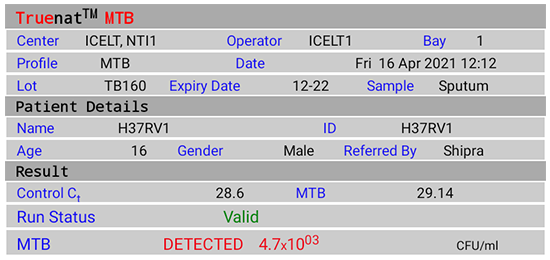
Figure 2(A): Truenat MTB Test Result Screen; DETECTED; Source: MolBio Diagnostics Pvt. Ltd.
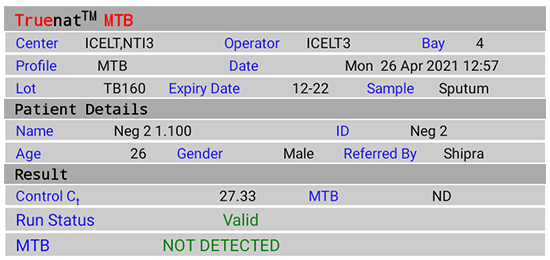
Figure 2(B): Truenat MTB Test Result Screen; NOT DETECTED; Source: MolBio Diagnostics Pvt. Ltd.

Figure 2(C): Truenat MTB Rif Test Result Screen; Rif Resistance Detected; Source: MolBio Diagnostics Pvt. Ltd.
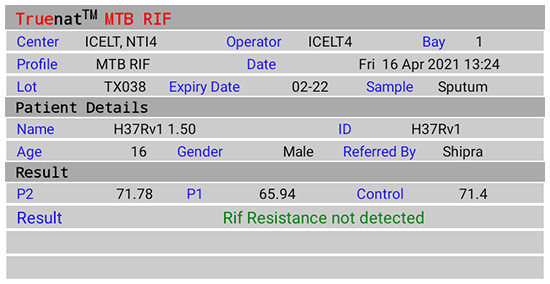
Figure 2(D): Truenat MTB Rif Test Result Screen; Rif Resistance Not Detected; Source: MolBio Diagnostics Pvt. Ltd.

Figure 2(E): Truenat MTB Rif Test Result Screen; Indeterminate; Source: MolBio Diagnostics Pvt. Ltd.
Video fileResources
Kindly provide your valuable feedback on the page to the link provided HERE
TrueNAT MTB Assay Results Interpretation: Detection of Mycobacterium tuberculosis and RIF Resistance
ContentOn completion of test run, the Test Result Screen displays the results for:
- Detection of Mycobacterium tuberculosis (Truenat MTB)
- “DETECTED” for Positive result, Cycle Threshold (Ct) value, Colony Forming Units per milliliter (CFU/ ml)
- “NOT DETECTED” for Negative result
- “Valid”/ “Invalid” for test validity based on amplification of Internal Positive Control (IPC)
- “Error” for test failure
- Detection of Rif Resistance (Truenat MTB-Rif Dx)
- “Rif Resistance Detected” if mutations to Rif are detected
- “Rif Resistance Not Detected” if mutations to Rif are not detected
- “Indeterminate” when test did not determine resistance to Rif
- “Error” for test failure
Resources
Kindly provide your valuable feedback on the page to the link provided HERE
- Detection of Mycobacterium tuberculosis (Truenat MTB)
Amplification and Detection of MTB and MTB-Rif
ContentProcedure
Equipment and reagents
- Truelab Uno/ Duo/ Quattro Real Time Quantitative micro–PCR analyzer
- Truenat MTB micro-PCR kit
- Truenat MTB Rif micro-PCR kit
- Truepet fixed volume (6 μl) precision micropipette
Amplification and detection of Mycobacterium tuberculosis (MTB)
- Wear gloves, laboratory coats, mask.
- Clean working surfaces with 1% Sodium hypochlorite, followed by 70% alcohol.
- Clean instruments with a paper towel dipped in 70% alcohol.
- Switch on the Truelab device by pressing the red button for two seconds.
- Select test bay.
- Select test profile: “MTB”, enter Details (Referred By, Patient ID, Gender, Patient Name, Age).
- Select the sample type.
- Press “Start Reaction". For Truelab Uno Dx, Press the eject button to open the chip tray. For Truelab Duo/Quattro, the chip tray opens automatically on tapping the “Start Reaction” .
- Take out “Truenat MTB chip” from the chip sleeve (check desiccant colour. If blue -chip can be used; discard chip if desiccant is pink/ white which indicates moisture is absorbed).
- Place the chip on the tray by aligning the registration holes with tray pins without touching the white reaction well. (the white reaction well should face upward).
- Open the microtube containing the freeze-dried PCR reagent (white colour) and place it on the microtube stand.
- Pipette 6 μl DNA from the Extraction Chamber (After DNA extraction and purification step) into the microtube.
- Wait 30-60 seconds for the DNA elute and PCR reagent to mix (clear solution obtained).
- Use the same tip to pipette 6 μl treated DNA from the microtube and load on the white reaction well of the chip.
- Discard the microtube and microtip (1% sodium hypochlorite).
- Start the test run.
- The test completes in 35 minutes, press ‘’RESULT’’ to view the result screen.
- Possible results:
- MTB Detected/ Not Detected/ Errors/ Invalid
- If MTB detected, test the same DNA eluate for Rif resistance using MTB-Rif chip. Select the MTB-Rif assay.
- If the result is Invalid/ Error, repeat amplification using the same extracted DNA and a new “Truenat MTB chip”. If Invalid again, repeat the test with a fresh sample.
- Tap “Open/ Close Tray” button to eject the chip tray.
- Lift the chip and discard (1% sodium hypochlorite).
Amplification and Detection of MTB Rif
- DNA from the MTB positive elutes is tested for Rif-resistance using the MTB-Rif chip.
- Select the test profile “MTB Rif”.
- Select the sample type.
- Press “Start Reaction". For Truelab Uno Dx, Press the eject button to open the chip tray. For Truelab Duo/Quattro, the chip tray opens automatically on tapping the “Start Reaction”.
- Take out “Truenat MTB Rif Dx chip” from the chip sleeve (check desiccant colour. If blue -chip can be used; discard chip if desiccant is pink/ white which indicates moisture is absorbed).
- Follow steps 10-16 as described in Amplification and detection of MTB (above).
- The test completes in 55 minutes, press ‘’RESULT’’ to view the result screen.
- Possible results:
- MTB Rif resistance detected/ MTB Rif resistance not detected/ Error/ Indeterminate.
- If result is Indeterminate/ Error, repeat the amplification using the same extracted DNA and new “Truenat MTB Rif Dx chip”. If Indeterminate/ Error again, repeat the test with a fresh sample.
- Tap “Open/ Close Tray” button to eject the chip tray.
- Lift the chip and discard (1% sodium hypochlorite).
The algorithm for Truenat MTB Assay (Figure) describes interpretation of test results obtained for Truenat MTB and Truenat MTB Rif Dx assays.
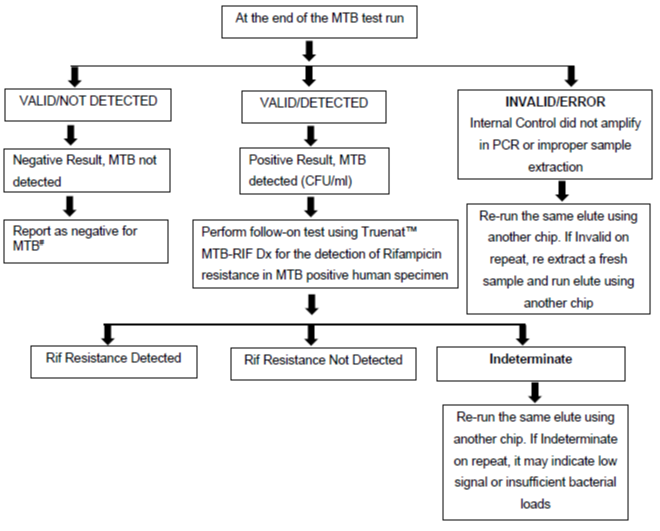
Figure: Truenat MTB Assay Results Interpretation: Algorithm; Source: Practical Guide to Implementation of Truenat Tests for the Detection of TB and Rifampicin Resistance
# Test is Valid as Internal Positive Control amplified
Video fileResources
- Practical Guide to Implementation of TrueNAT Tests for the Detection of TB and Rifampicin Resistance.
- Truenat MTB Pack Insert.
- Truenat MTB Rif Pack Insert.
Kindly provide your valuable feedback on the page to the link provided HERE
Results Entry in Lab Register for NAAT
ContentThe results for Nucleic Acid Amplification Test (NAAT) assays are entered in Culture and Drug Susceptibility Testing (C&DST) register. The key variables entered are shown in the table below.
Table: Key Variables entered in C&DST Register; Source: Guidelines for PMDT in India, 2021. VARIABLES SET 1 VARIABLES SET 2 VARIABLES SET 3 VARIABLES SET 4 Test ID Health Facility (HF) name Residential district Current facility HF type Date of test updated in Nikshay Lab type Type of test Predominant symptom Date tested Patient ID Reason for testing Predominant symptom duration Date reported Episode ID Treatment status History of Anti-TB Treatment (ATT) Test status Name Diagnosis date No. of Health Care Provider (HCP) visited before the diagnosis of the current episode Type of specimen Gender TB treatment start date The visual appearance of sputum Date of specimen collection Age Current facility state State name Primary phone Current facility district District name Address Current facility TB Unit (TU) TB unit Residential state Current facility HF NAAT results are reported in the results section of “Request Form for examination of biological specimen for TB” including:
- Select Type of test: Cartridge-based Nucleic Acid Amplification Test (CBNAAT)/ TrueNAT
- Select Sample: A/B
- Select M. tuberculosis: Detected/ Not Detected/ Not Available (NA)
- Select Rif Resistance: Detected/ Not Detected/ Indeterminate/ NA
- Select Test: No result/ Invalid/ Error; Error code
- Date tested
- Date Reported
- Reported by (name and signature)
- Laboratory name
Video fileVideo : CBNAAT/Truenat Results Entry in Lab Register
Resources
Monitoring Different Types of Errors with Truenat
ContentMonitoring of Truenat errors
There are various types of errors that occur with the Truenat machines, which include:
- Coded errors related to the Trueprep AUTO v2 sample prep device
- Coded errors related to the Truelab micro-PCR Analyzer
- Non-coded system errors/failures
Monitoring the Trueprep AUTO v2 errors
-
The Truenat system is a closed amplification system (i.e., the amplified product is sealed in the chip), and an enzyme system is incorporated in the reaction mix to prevent previously amplified material from getting re-amplified.
- It is recommended that testing sites perform negative control tests using Trueprep AUTO lysis buffer reagent and sterile Phosphate Buffered Saline (PBS) monthly or when contamination is suspected (e.g., an unusually high proportion of specimens with ‘M.tb detected’).
- Swab testing of work surfaces and both the Truelab and Trueprep machines should be conducted monthly.
- Used and expired cartridges should be discarded as per the protocols, so they are not re-used.
Monitoring the Truelab errors
-
To ensure that the Truelab micro Polymerase Chain Reaction (PCR) Analyzer is working accurately, the manufacturer recommends running positive and negative controls (which can be purchased as part of the Truenat™ Positive Control Kit- Panel I) periodically.
- The positive and negative controls can also be used for lot-to-lot verification and assessment of reagents if the temperature of storage areas falls outside the recommended ranges.
- An optional “Plot” view on the digital interface is also available while the process is being performed that allows for monitoring test progress in real-time.
- Truelab Analyzers can be configured to send data on device performance to the manufacturer’s (default configuration) or local servers to allow the manufacturer (without sharing any patient data) and/or the National TB Elimination Programme to monitor instrument performance on a real-time basis.
- This helps in the identification and possible prevention of instrument malfunctions or breakdowns, detection of user errors and retraining needs, and monitoring of instrument and test utilization across fleets of instruments.
Resources
- Guidelines on Programmatic Management of Drug-resistant TB (PMDT) in India;CTD, MoHFW, India,2021.
- Trueprep AUTO v2 Universal Cartridge Based Sample Prep Device; User Manual V4.
- TRUELAB UNO Dx Real Time Quantitative micro PCR Analyzer; manual VER 04.
Assessment
Question Answer 1 Answer 2 Answer 3 Answer 4 Correct answer Correct explanation Page id Part of Pre-test Part of Post-test Identify if the statement is True or False
Running positive and negative controls periodically is recommended to ensure that the Truelab micro PCR Analyzer is working accurately.
True False 1 Running positive and negative controls periodically is recommended by the manufacturer to ensure that the Truelab micro PCR Analyzer is working accurately Yes Yes Truelab Analyzers can be configured to send data on device performance to the manufacturer’s (default configuration) or local servers to allow the manufacturer (without sharing any patient data) and/or the National TB Elimination Programme to monitor instrument performance on a real-time basis.
True False 1 This helps in the identification and possible prevention of instrument malfunctions or breakdowns, detection of user errors and retraining needs, and monitoring of instrument and test utilization across fleets of instruments. Yes
Yes
Fullscreen